How It Works
The lifecycle of a lottery.
Every AuditDraw lottery follows the same disciplined path, from the moment your data arrives to the moment it is destroyed and your signed results are delivered. A typical lottery takes two to three hours, from start to finish.
1 Intake
You provide your applicant spreadsheet (.xlsx or .csv) and lottery options, either by upload or by email.
2 Validation
Before anything else, your data passes an automated validation and integrity check. Structure is confirmed, ticket IDs are checked for uniqueness, weight values are verified, and column roles are confirmed.
3 The isolated run
At the scheduled time, a dedicated, sealed server spins up for this lottery alone, with no internet access in or out.
4 The drawing
Entries are drawn one at a time, each separated by its own interval and paced deliberately, so every drawn entry receives a unique timestamp down to the minute.
5 Records & reports
On the same sealed server, a separate process reads the finished, read-only results and generates the PDF reports, the Certificate of Authenticity, and the summary files, then signs each file with signatures specific to that lottery.
6 Source data purge
The lottery is marked complete and the applicant data is destroyed. Only the server that processed your lottery can produce its records, and it does so only once, immediately before purging the source data.
7 Delivery
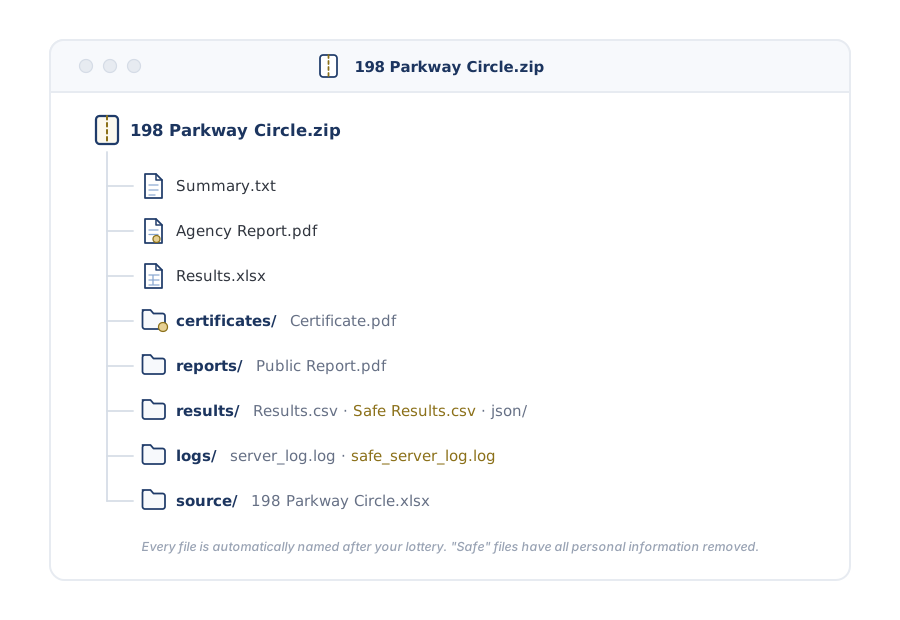
Everything is packaged into a single deliverables archive (.zip), including an untouched copy of your original source file. The moment the lottery completes, an email from an official AuditDraw address goes out to your pre-approved recipients with a secure download link for the archive that remains available for 30 days.
From a two-entry drawing to a weighted lottery of thousands.
Options are available to cover all of your unique lottery types and requirements. Underneath every option is the same foundation: cryptographically secure randomization producing unbiased results, with each drawn entry independently timestamped and recorded.
Flexible ticket IDs
Use your own ticket, application, or entry numbers, or let AuditDraw generate unique ticket IDs for you at no charge.
Column pass-through
Carry any extra columns (names, notes, internal references) straight through to your results, so the output fits the way your team already works.
Weighting
Give an applicant more than one chance to place favorably. A weight of 2 behaves like two entries, a weight of 3 like three, using shuffle-based, real-world simulation without statistical biasing.
Coming soon
Additional options such as Entry Linking, Applicant Groups, Priority Tiers, and Multi-Phase Lotteries are in the works and will soon be available.
Every option is set per lottery, so different programs can run different configurations without affecting one another.
Whatever you configure, the deliverables and verification work exactly the same way.
How weighting works
Suppose three applicants enter a drawing: Avery has a weight of 1 (one chance), Brooks a weight of 2 (twice the chance), and Casey a weight of 3 (three times the chance). AuditDraw places the equivalent of six tickets into the shuffle, and every one of them is drawn independently.
Casey is three times as likely as Avery to be drawn first, but nothing is guaranteed: a weight of 3 doesn't promise Casey places ahead of everyone with a weight of 1; it only means Casey holds three of the six chances. When a weighted applicant is drawn, their remaining chances are pulled at that moment, so by default each applicant still appears once in the results, positioned by their best draw.
In practice, most agencies use small ranges such as 1–3 or 1–5. Very large weights rarely reflect a real policy and can distort a drawing in ways that are hard to explain to applicants. Smaller, intentional ranges are almost always the better choice.
Your source data, kept and organized the way you use it.
Applicant data is submitted as a spreadsheet: Excel (.xlsx) or CSV (.csv). You can name the file anything you like, and at minimum a lottery can run with a single column and just two applicants. The column order does not matter and extras can be passed-through.
The columns:
Applicant identifier (always required)
Whatever represents an applicant to you: a last name, an email address, a CRM number, any reference you choose. Values do not need to be unique. If one applicant should have several separate entries, simply list them on multiple rows.
Ticket ID (optional)
AuditDraw draws by ticket ID, not by applicant identifier. Most agencies include their own entry, ticket, or application number, which links results back to internal systems and stands in for personal information in the public report. Provided ticket IDs must be unique. If you don't provide them, AuditDraw generates unique ticket IDs at no charge.
Weight (optional)
To use weighting, include a numeric column of whole numbers; the column can be named anything. When weighting is enabled, every row must contain a weight value.
Pass-through & sensitive columns (optional)
Any additional columns (first names, unit preferences, notes, internal flags) carry through to your results untouched. Deselect columns you don't want passed through, and mark columns as sensitive so they are excluded from the "Safe" (censored) results.
Example spreadsheet (Identifier is the only required column):
Simple for your team. Rigorous everywhere it counts.
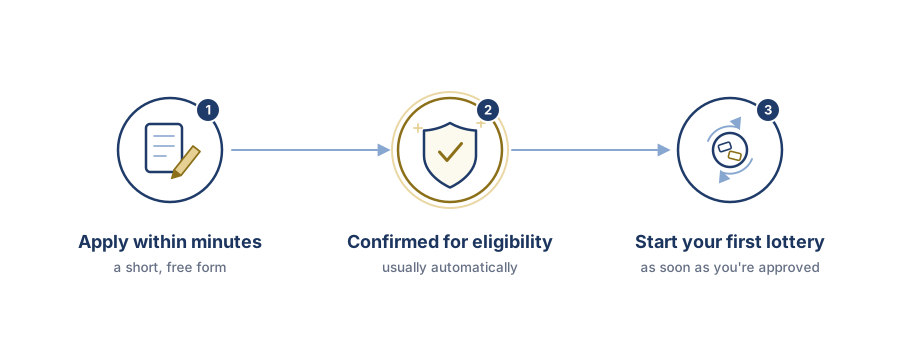
Create your AuditDraw account today. Registration is free and takes only a few minutes.*
*Accounts requiring manual eligibility review are typically confirmed within 1–2 business days.